launcher的创建 目录
launcher服务是一个snlua服务。
当调用skynet.newservice请求创建某个服务的时候,实际上会把创建请求发送到launcher服务。launcher来真正启动一个目标服务。launcher本身又是怎么启动的?他是在bootstrap服务里面启动的。看看代码 11行。
bootstrap服务也是一个snlua服务
1 2 3 4 5 6 7 8 9 10 11 12 13 14 15 16 17 18 19 20 21 22 23 24 25 26 local skynet = require "skynet" local harbor = require "skynet.harbor" local service = require "skynet.service" require "skynet.manager" skynet.start(function () local standalone = skynet.getenv "standalone" local launcher = assert (skynet.launch("snlua" ,"launcher" )) skynet.name(".launcher" , launcher) local harbor_id = tonumber (skynet.getenv "harbor" or 0 ) if harbor_id == 0 then assert (standalone == nil ) standalone = true skynet.setenv("standalone" , "true" ) end skynet.newservice "service_mgr" pcall (skynet.newservice,skynet.getenv "start" or "main" ) skynet.exit () end )
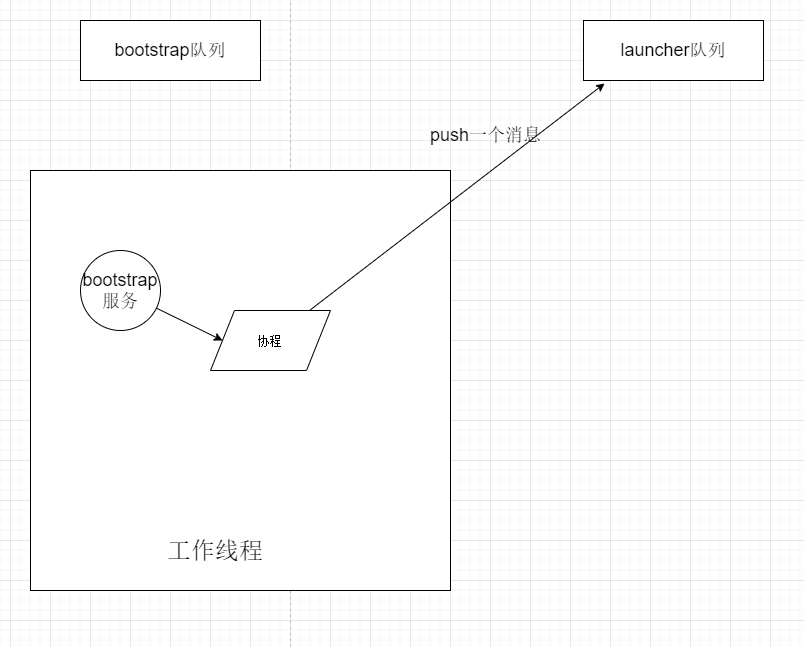
也就是说 skynet.launch("snlua","launcher") 创建了 launcher服务。这两个参数的意思是 我们是要创建一个snlua服务,对应的脚本文件是launcher.lua。这个调用不会挂起我们当前协程,但不是在当前工作线程完成所有创建任务的。
当前工作线程完成步骤1 当前线程主要是push了 第一个消息 给我们创建的服务。我们跟踪一下
1
2
3
4
5
6
function skynet.launch (...) local addr = c.command("LAUNCH" , table .concat ({...}," " )) if addr then return tonumber (string .sub (addr , 2 ), 16 ) end end
跟踪到c层。
1
2
3
4
5
6
7
8
9
10
11
12
13
14
15
16
17
static int lcommand (lua_State *L) { struct skynet_context * context =1 )); const char * cmd = luaL_checkstring(L,1 ); const char * result; const char * parm = NULL ; if (lua_gettop(L) == 2 ) { parm = luaL_checkstring(L,2 ); } result = skynet_command(context, cmd, parm); if (result) { lua_pushstring(L, result); return 1 ; } return 0 ; }
11行
1
2
3
4
5
6
7
8
9
10
11
12
13
14
15
16
17
18
19
static struct command_func cmd_funcs [] = { "LAUNCH" , cmd_launch }, { NULL , NULL }, }; const char * skynet_command (struct skynet_context * context, const char * cmd , const char * param) { struct command_func * method =0 ]; while (method->name) { if (strcmp (cmd, method->name) == 0 ) { return method->func(context, param); } ++method; } return NULL ; }
继续跟踪 cmd_launch
1
2
3
4
5
6
7
8
9
10
11
12
13
14
15
16
static const char *cmd_launch (struct skynet_context * context, const char * param) { size_t sz = strlen (param); char tmp[sz+1 ]; strcpy (tmp,param); char * args = tmp; char * mod = strsep(&args, " \t\r\n" ); args = strsep(&args, "\r\n" ); struct skynet_context * inst = if (inst == NULL ) { return NULL ; } else { id_to_hex(context->result, inst->handle); return context->result; } }
当我们看到 9行,就感觉有点熟悉了。因为我们的logger服务当初也是这样创建的。回顾logger服务 。再次看看skynet_context_new
1
2
3
4
5
6
7
8
9
10
11
12
13
14
15
16
17
18
19
20
21
22
23
24
25
struct skynet_context * skynet_context_new (const char * name, const char *param) { struct skynet_module * mod = void *inst = skynet_module_instance_create(mod); struct skynet_context * ctx =sizeof (*ctx)); ctx->handle = skynet_handle_register(ctx); struct message_queue * queue =queue = skynet_mq_create(ctx->handle); int r = skynet_module_instance_init(mod, inst, ctx, param); if (r == 0 ) { struct skynet_context * ret = if (ret) { ctx->init = true ; } skynet_globalmq_push(queue ); return ret; } }
skynet_context_new 是创建一个服务,snlua服务跟logger服务创建过程大致类似。主要不同点在于他们属于不同的模块,所以对应模块的创建函数和初始化函数是不同的。我们主要看snlua模块的初始化实例的函数 snlua_init
1
2
3
4
5
6
7
8
9
10
11
12
13
14
15
16
17
18
19
20
static const char *cmd_reg (struct skynet_context * context, const char * param) { if (param == NULL || param[0 ] == '\0' ) { sprintf (context->result, ":%x" , context->handle); return context->result; } } int snlua_init (struct snlua *l, struct skynet_context *ctx, const char * args) { int sz = strlen (args); char * tmp = skynet_malloc(sz); memcpy (tmp, args, sz); skynet_callback(ctx, l , launch_cb); const char * self = skynet_command(ctx, "REG" , NULL ); uint32_t handle_id = strtoul(self+1 , NULL , 16 ); skynet_send(ctx, 0 , handle_id, PTYPE_TAG_DONTCOPY,0 , tmp, sz); return 0 ;
主要做了两件事。
skynet_callback 设置服务的回调函数 ,也就是处理队列中消息时使用的函数。这里设置的是 launch_cb
skynet_send 往自己的队列中push了一个消息。
到这里 skynet_context_new 的处理完成。
我们再次回到调用 skynet_context_new 的地方
1
2
3
4
5
6
7
8
9
10
11
12
13
14
static const char *cmd_launch (struct skynet_context * context, const char * param) { size_t sz = strlen (param); char tmp[sz+1 ]; strcpy (tmp,param); char * args = tmp; char * mod = strsep(&args, " \t\r\n" ); args = strsep(&args, "\r\n" ); struct skynet_context * inst = id_to_hex(context->result, inst->handle); return context->result; }
我们看 12行 最终返回了 新服务的地址。再回到lua层的起点
1
2
3
4
5
6
function skynet.launch (...) local addr = c.command("LAUNCH" , table .concat ({...}," " )) if addr then return tonumber (string .sub (addr , 2 ), 16 ) end end
所以我们调用skynet.launch 最终返回了一个 新服务地址。总结下此时我们所在的bootstarp服务创建了 launcher服务,launcher给它自己的队列里push了第一个消息。launcher队列将来被工作线程执行到时,就会开始处理这个消息。
可能另一个工作线程完成步骤2 现在假设 有一个工作线程来驱动launcher工作了。那么第一个消息 的处理会交给 launch_cb。
1
2
3
4
5
6
7
8
9
10
11
static int launch_cb (struct skynet_context * context, void *ud, int type, int session, uint32_t source , const void * msg, size_t sz) { assert(type == 0 && session == 0 ); struct snlua *l = skynet_callback(context, NULL , NULL ); int err = init_cb(l, context, msg, sz); return 0 ; }
上面取消了回调函数。然后调用init_cb。这个函数你暂时需要关注两点。1.代表当前服务的context被保存在注册表中了。以后在需要context时,可以方便的获取。2. 我们最终执行了一个lua文件。这个lua文件就是launcher.lua服务代表的文件。
1
2
3
4
5
6
7
8
9
10
11
12
13
14
15
16
17
18
19
20
21
22
23
24
25
26
27
28
29
30
31
32
33
34
35
36
37
38
39
40
41
42
43
44
45
46
47
48
49
50
51
52
53
54
55
56
57
58
59
60
61
62
63
64
static int init_cb (struct snlua *l, struct skynet_context *ctx, const char * args, size_t sz) { lua_State *L = l->L; l->ctx = ctx; lua_gc(L, LUA_GCSTOP, 0 ); lua_pushboolean(L, 1 ); lua_setfield(L, LUA_REGISTRYINDEX, "LUA_NOENV" ); luaL_openlibs(L); luaL_requiref(L, "skynet.profile" , init_profile, 0 ); int profile_lib = lua_gettop(L); lua_getglobal(L, "coroutine" ); lua_getfield(L, profile_lib, "resume" ); lua_setfield(L, -2 , "resume" ); lua_getfield(L, profile_lib, "wrap" ); lua_setfield(L, -2 , "wrap" ); lua_settop(L, profile_lib-1 ); lua_pushlightuserdata(L, ctx); lua_setfield(L, LUA_REGISTRYINDEX, "skynet_context" ); luaL_requiref(L, "skynet.codecache" , codecache , 0 ); lua_pop(L,1 ); lua_gc(L, LUA_GCGEN, 0 , 0 ); const char *path = optstring(ctx, "lua_path" ,"./lualib/?.lua;./lualib/?/init.lua" ); lua_pushstring(L, path); lua_setglobal(L, "LUA_PATH" ); const char *cpath = optstring(ctx, "lua_cpath" ,"./luaclib/?.so" ); lua_pushstring(L, cpath); lua_setglobal(L, "LUA_CPATH" ); const char *service = optstring(ctx, "luaservice" , "./service/?.lua" ); lua_pushstring(L, service); lua_setglobal(L, "LUA_SERVICE" ); const char *preload = skynet_command(ctx, "GETENV" , "preload" ); lua_pushstring(L, preload); lua_setglobal(L, "LUA_PRELOAD" ); lua_pushcfunction(L, traceback); assert(lua_gettop(L) == 1 ); const char * loader = optstring(ctx, "lualoader" , "./lualib/loader.lua" ); int r = luaL_loadfile(L,loader); lua_pushlstring(L, args, sz); r = lua_pcall(L,1 ,0 ,1 ); lua_settop(L,0 ); if (lua_getfield(L, LUA_REGISTRYINDEX, "memlimit" ) == LUA_TNUMBER) { size_t limit = lua_tointeger(L, -1 ); l->mem_limit = limit; skynet_error(ctx, "Set memory limit to %.2f M" , (float )limit / (1024 * 1024 )); lua_pushnil(L); lua_setfield(L, LUA_REGISTRYINDEX, "memlimit" ); } lua_pop(L, 1 ); lua_gc(L, LUA_GCRESTART, 0 ); return 0 ; }
每个snlua服务都有一个 lua_State成员。lua_State代表一个lua环境,没有lua环境,后面是不能把消息交给lua处理的。
配置文件具体是怎么读取的呢 可以看这里 skynet启动时读取配置文件
我们看上面的lua文件是怎么被执行到的。看 49行。实际上我们第一个执行到的文件是 loader.lua。在这个文件里面,才运行了launcher.lua文件。
1 2 3 4 5 6 7 8 9 10 11 12 13 14 15 16 17 18 19 20 21 22 23 24 25 26 27 28 29 30 31 32 33 34 35 36 37 38 39 40 41 42 43 44 45 46 local args = {}for word in string .gmatch (..., "%S+" ) do table .insert (args, word) end SERVICE_NAME = args[1 ] local main, patternlocal err = {}for pat in string .gmatch (LUA_SERVICE, "([^;]+);*" ) do local filename = string .gsub (pat, "?" , SERVICE_NAME) local f, msg = loadfile (filename) if not f then table .insert (err, msg) else pattern = pat main = f break end end LUA_SERVICE = nil package .path , LUA_PATH = LUA_PATH package .cpath , LUA_CPATH = LUA_CPATH local service_path = string .match (pattern, "(.*/)[^/?]+$" ) if service_path then service_path = string .gsub (service_path, "?" , args[1 ]) package .path = service_path .. "?.lua;" .. package .path SERVICE_PATH = service_path else local p = string .match (pattern, "(.*/).+$" ) SERVICE_PATH = p end _G .require = (require "skynet.require" ).require main(select (2 , table .unpack (args)))
lua的模式匹配可以看看这里 lua模式匹配 ;另外 package.path , LUA_PATH = LUA_PATH 这句可以理解为 package.path , LUA_PATH = func(),当前func函数只有一个返回值,但是左边却有两个变量,所以LUA_PATH 只能是nil了
44行 最后开始执行我们的 launcher.lua文件。我们当前只关注下面的代码。
1 2 3 4 5 6 7 8 9 10 11 12 13 14 15 16 skynet.dispatch("lua" , function (session, address, cmd , ...) cmd = string .upper (cmd) local f = command[cmd] if f then local ret = f(address, ...) if ret ~= NORET then skynet.ret(skynet.pack(ret)) end else skynet.ret(skynet.pack {"Unknown command" } ) end end )skynet.start(function () end )
也就是说执行launcher.lua文件,主要是调用了上面两个函数。skynet.dispatch注册了 lua类型消息的回调函数。也就是收到lua类型消息时,都交给这个函数处理。另外一个是skynet.start函数。skynet.start主要做了两件事。1. 注册回调函数 2.注册一个定时器
1
2
3
4
5
6
7
function skynet.start (start_func) c.callback(skynet.dispatch_message) init_thread = skynet.timeout(0 , function () skynet.init_service(start_func) init_thread = nil end ) end
第2行是注册回调函数 我们看代码
1
2
3
4
5
6
7
8
9
10
11
12
13
14
15
16
17
static int lcallback (lua_State *L) { struct skynet_context * context =1 )); int forward = lua_toboolean(L, 2 ); luaL_checktype(L,1 ,LUA_TFUNCTION); lua_settop(L,1 ); lua_rawsetp(L, LUA_REGISTRYINDEX, _cb); lua_rawgeti(L, LUA_REGISTRYINDEX, LUA_RIDX_MAINTHREAD); lua_State *gL = lua_tothread(L,-1 ); skynet_callback(context, gL, _cb); return 0 ; }
注意上面的 13行,注册了服务的回调函数 _cb。我们看看当我们服务收到消息时,是怎么处理的。
1
2
3
4
5
6
7
8
9
10
11
12
13
14
15
16
17
18
19
20
21
22
23
24
25
26
27
static int _cb(struct skynet_context * context, void * ud, int type, int session, uint32_t source, const void * msg, size_t sz) { lua_State *L = ud; int trace = 1 ; int r; int top = lua_gettop(L); if (top == 0 ) { lua_pushcfunction(L, traceback); lua_rawgetp(L, LUA_REGISTRYINDEX, _cb); } else { assert(top == 2 ); } lua_pushvalue(L,2 ); lua_pushinteger(L, type); lua_pushlightuserdata(L, (void *)msg); lua_pushinteger(L,sz); lua_pushinteger(L, session); lua_pushinteger(L, source); r = lua_pcall(L, 5 , 0 , trace); if (r == LUA_OK) { return 0 ; } }
注意 21行 最终把 消息的五个参数 传递给了lua层。接下来关注注册定时器的代码。关于定时器的使用,可以看看这里 初试定时器
1
2
3
4
5
6
7
8
9
10
11
12
13
14
15
16
17
18
19
20
21
22
function skynet.init_service (start) local function main () skynet_require.init_all() start() end local ok, err = xpcall (main, traceback ) if not ok then skynet.error ("init service failed: " .. tostring (err)) skynet.send(".launcher" ,"lua" , "ERROR" ) skynet.exit () else skynet.send(".launcher" ,"lua" , "LAUNCHOK" ) end end function skynet.start (start_func) c.callback(skynet.dispatch_message) init_thread = skynet.timeout(0 , function () skynet.init_service(start_func) init_thread = nil end ) end
上面代码注册了一个定时器。定时器会获取一个协程,这个协程的任务函数是一个 匿名函数。当定时器触发时,匿名函数被执行,这个匿名函数内部会调用我们注册的启动函数 start_func ,然后会发送一个消息通知 launcher。回到我们 launcher.lua文件
1 2 3 4 5 6 7 8 9 10 11 12 13 14 15 16 skynet.dispatch("lua" , function (session, address, cmd , ...) cmd = string .upper (cmd) local f = command[cmd] if f then local ret = f(address, ...) if ret ~= NORET then skynet.ret(skynet.pack(ret)) end else skynet.ret(skynet.pack {"Unknown command" } ) end end )skynet.start(function () end )
我们发现 我们通过skynet.start注册的star_func函数没有做任何事情。最后定时器协程被回收了。此时认为launcher服务启动完成了。over
Barbecue
今天学习了吗
此文章版权归Barbeuce所有,如有转载,请注明明来自原作者